Deleting your account is permanent and cannot be undone. Please make sure you really want to delete it before proceeding.
You can permanently delete your account at any time from within the app.
⚠️ Important Notice
When you choose to Delete Account, the following will happen:
- Your account will be permanently deleted
- All your data will be permanently removed from our servers
-
This includes:
- Profile information (username, email, ID)
- Game progress and achievements
- In-game data (coins, rewards, unlocked items)
- This action is irreversible
- You will not be able to recover your account after deletion
📱 How to Delete Your Account
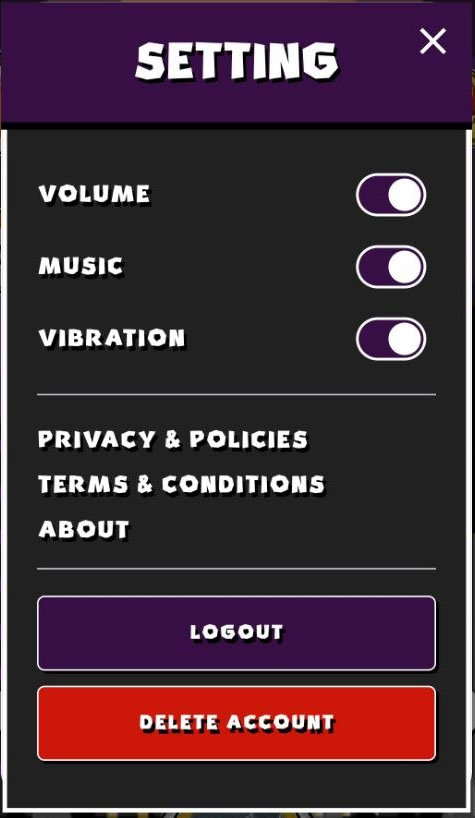
Step 1: Open Settings
Go to the Settings page in the app and tap on "DELETE ACCOUNT".
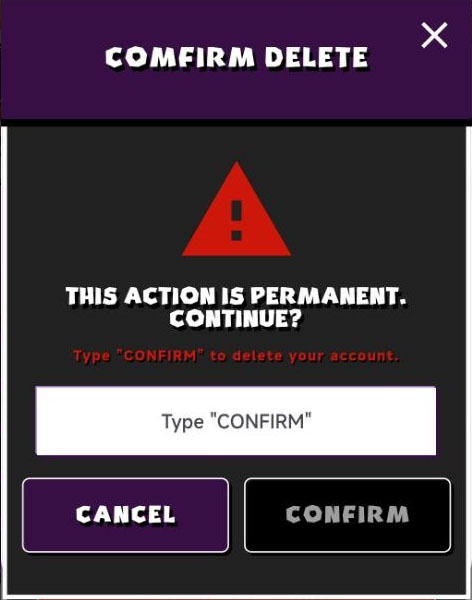
Step 2: Confirm Deletion
A confirmation dialog will appear asking you to confirm your decision.
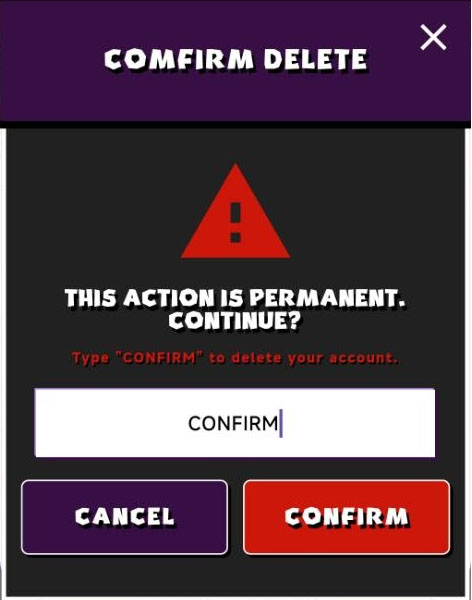
Step 3: Type "CONFIRM"
To proceed, type "CONFIRM" exactly as shown and Confirm.
🔐 After Deletion
- Your account is immediately and permanently deleted
- All associated data is removed from our database
- You will be logged out automatically
Alternative Account Deletion Method
If you cannot access the app, you can request account deletion by email.
Please send a request to: caffeinecup2025.co@gmail.com
Include:
- Your Player ID
- Your Username or Email
We will process your request within 7 days.